Android 16's Bluetooth Fix: A welcome return to simplicity for Pixel users
Google's finally rolled out its Material 3 Expressive update to Pixel phones running Android 16, and I gotta say, it's a breath of fresh air. There are bolder texts, fancy animations and more prominent toggles. I especially appreciate the customizable quick settings menu, which lets you resize those quick setting tiles. However, there's one change that truly makes my day: the Bluetooth tile's revamped behavior.
I remember when Android 14 messed with the Bluetooth tile, forcing us to tap twice just to toggle Bluetooth. Seriously? While it wasn't a life-or-death situation, it got on my nerves. As someone juggling multiple devices, like connecting my earphones to a tablet while doing chores, having to tap twice to disable Bluetooth on my primary phone felt like a first world problem. Don't get me wrong, I'm aware that multi-point connectivity is a thing, but I'm not about to ditch perfectly good earphones just for that.
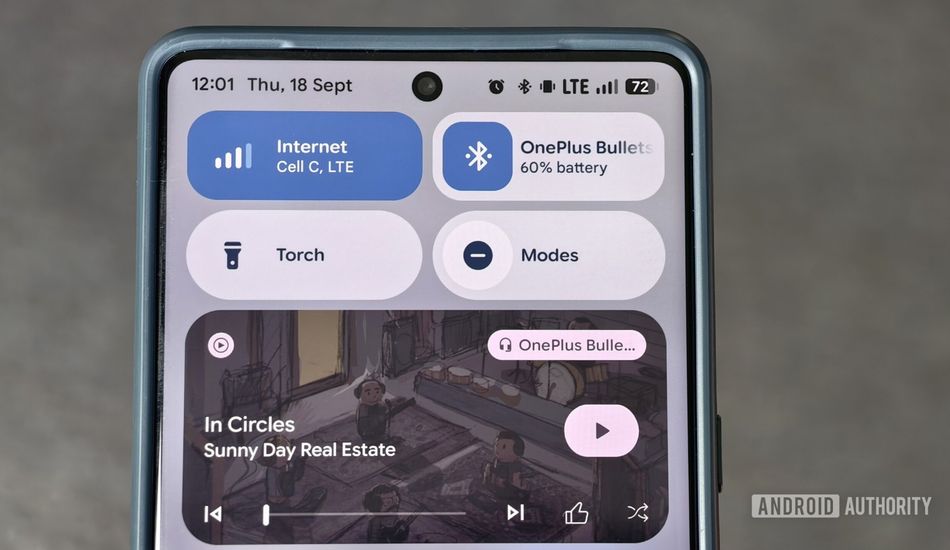
Thankfully, the Expressive update brings back the one-tap toggle for Bluetooth. Now, a simple tap on the Bluetooth tile quickly enables or disables connectivity. A long-press still takes you to the familiar pop-up menu. If you're using the larger Bluetooth tile, you can tap the Bluetooth icon to toggle connectivity, or tap the area outside the icon to bring up the pop-up menu. It's a small change, but it makes a big difference in my daily routine.
When you hold any part of the large tile, it takes you to the Connected devices section in your settings menu for even more options. It's convenient, and I like how the paired accessory's name and battery percentage are displayed within the tile. Other Android skins usually show the accessory's name but hide the battery level in the status bar, if they show it at all.
This change has already made it less annoying to manage Bluetooth earphones across my devices, and I'm grateful for it. Now, I hope Google will split the internet tile and give us separate Wi-Fi and mobile data toggles again. But hey, that's just me.
Source: AndroidAuthority